Building an MCP Server for Your Internal Tools: An Architecture Walkthrough
How to build an MCP server for internal tools: tools vs resources vs prompts, transport choice, OAuth, least privilege, audit logs, Inspector tests, deployment.
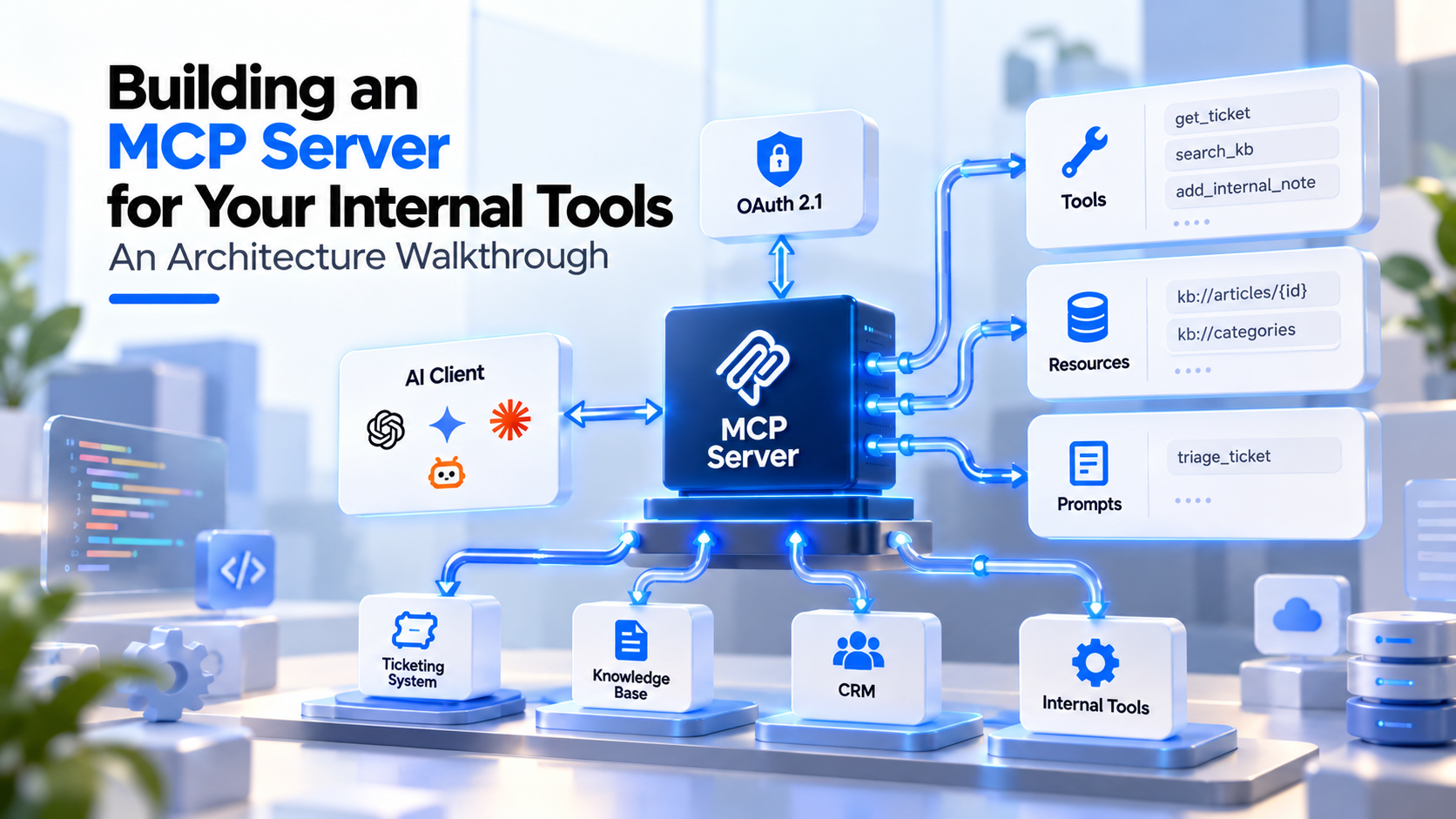
A production MCP server for an internal tool is a small, task-shaped service: a handful of narrowly scoped tools, read-only by default, served over Streamable HTTP behind OAuth, with schema-validated inputs, masked errors and an audit log of every call. Whether you build in-house or buy MCP server development services, those are the decisions that matter, and this walkthrough covers each one with working Python code.
We assume you already know what MCP is. If not, start with our explainer on what MCP is and why enterprises need it. Every API name and spec rule below was checked in October 2026 against the 2026-07-28 MCP specification and version 2 of the official Python SDK. It is part of our agentic AI and LLM engineering series.
The reference architecture at a glance
The running example is an MCP server for an internal IT helpdesk: a ticketing system plus a knowledge base. Swap in your CRM, ERP or document store and the same decisions apply.
| Layer | Decision | Default we recommend |
|---|---|---|
| Capabilities | What becomes a tool, a resource or a prompt | Few tools, shaped around tasks; reads before writes |
| Transport | stdio or Streamable HTTP | Streamable HTTP for anything shared; stdio for single-user local tools |
| Authorization | How callers prove identity and rights | OAuth 2.1 with your identity provider; server acts as a resource server |
| Least privilege | What a token can do | Small baseline scope, step-up for writes, service credentials scoped per tool |
| Validation | What the server accepts and returns | JSON Schema from type hints, plus business-rule checks and output trimming |
| Audit | What gets recorded | One structured log line per call, to stderr or OpenTelemetry |
| Testing | How you know it works | MCP Inspector by hand, pytest with the in-memory client in CI |
| Deployment | Where it runs | Stateless containers behind a load balancer and an API gateway |
Step 1: What should your server expose as tools, resources and prompts?
Start from the jobs people want done, not from your API's endpoint list. The spec gives each primitive a different control model, and that tells you where each capability belongs.
| Primitive | Who decides when it is used (per the spec) | Use it for | Helpdesk example |
|---|---|---|---|
| Tool | The model ("model-controlled") | Actions and lookups the model chooses mid-task | get_ticket, search_kb, add_internal_note |
| Resource | The host application ("application-driven") | Reference data a user or app attaches as context | kb://articles/{article_id} |
| Prompt | The user ("user-controlled"), often as slash commands | Repeatable workflows a person starts deliberately | triage_ticket |
Five rules keep the tool list safe and usable:
- Shape tools around tasks. get_ticket returns the fields an agent needs in one call. Do not mirror twelve REST endpoints.
- Ship read-only first. Add write tools one at a time, each with its own scope and an approval story.
- Name tools within the spec's guidance: 1 to 128 characters, case-sensitive, using letters, digits, underscore, hyphen and dot.
- Hide what a caller cannot use. The 2026-07-28 spec lets tools/list vary by the authorization on the request, so a token without write scope need not see write tools. It must not vary by connection, and the spec asks for a deterministic order so clients can cache it.
- Use explicit handles for multi-step state. The protocol has no sessions any more. If a tool needs state across calls, return an opaque handle and accept it as an argument. The spec warns that a handle "is a name, not a capability," so check the caller's rights against it on every call.
Our helpdesk inventory looks like this:
| Capability | Type | Scope required | Risk |
|---|---|---|---|
| search_kb | Tool, read | helpdesk:read | Low |
| get_ticket | Tool, read | helpdesk:read | Low |
| add_internal_note | Tool, write | helpdesk:notes.write | Medium: reversible, staff-only |
| kb://articles/{article_id} | Resource | helpdesk:read | Low |
| triage_ticket | Prompt | helpdesk:read | Low |
Nothing here closes tickets, changes priority or emails a requester. Those stay out until there is a human approval step. If this server is the back end for an internal knowledge assistant, the read tools alone cover most of the value.
Step 2: Should you use stdio or Streamable HTTP?
The spec defines two standard transports, and the choice follows from who will use the server.
| stdio | Streamable HTTP | |
|---|---|---|
| How it runs | The client launches the server as a subprocess | An independent service with one MCP endpoint that accepts POST |
| Who uses it | One person on one machine | Many users and many AI applications |
| Authorization | Credentials come from the environment; the spec says stdio implementations should not follow the OAuth flow | OAuth 2.1 per the spec's authorization section |
| Logging | Never write to stdout; it corrupts the JSON-RPC stream | Normal service logging |
| Fits | Developer tools, personal automations, prototypes | Shared internal systems, anything with real data |
For an internal tool used by a team, choose Streamable HTTP. The 2026-07-28 revision made it much easier to run:
- No sessions. The initialize handshake and the Mcp-Session-Id header are gone. Every request carries its own protocol version and client capabilities, so any replica can serve any request.
- POST only. The GET stream endpoint was removed. Long-lived change notifications now use a subscriptions/listen request.
- Routable headers. Clients must send MCP-Protocol-Version, Mcp-Method and, for tool calls, resource reads and prompt fetches, Mcp-Name. The server must reject requests where headers and body disagree, with error code -32020 (HeaderMismatch).
- Origin checks. Servers must validate the Origin header to block DNS rebinding, and local servers should bind to 127.0.0.1 only.
On SDK versions: pip install mcp now installs Python SDK 2.x, which supports 2026-07-28 and every earlier revision. Version 1.x still gets critical fixes on its own branch. If you are not ready to migrate, the SDK maintainers suggest pinning mcp>=1.28,<2. TypeScript, C#, Go, Rust and Ruby SDKs are also Tier 1. We use Python here.
Step 3: How do you write the server itself?
Install the SDK with uv add "mcp[cli]" (or pip). The MCPServer class turns type hints and docstrings into tool definitions.
# server.py
import logging
from typing import Annotated, Literal

from pydantic import BaseModel, Field
from mcp.server import MCPServer
from mcp.server.mcpserver.exceptions import ToolError
from mcp.types import ToolAnnotations

import helpdesk  # your existing internal API client (illustrative)

logger = logging.getLogger("helpdesk_mcp")  # stdlib logging writes to stderr

mcp = MCPServer("helpdesk")  # authorization is added in Step 4

TicketId = Annotated[
    str, Field(pattern=r"^HD-\d{4,8}$", description="Ticket ID, for example HD-10423")
]


class TicketSummary(BaseModel):
    ticket_id: str
    status: Literal["open", "pending", "resolved", "closed"]
    priority: Literal["low", "normal", "high", "urgent"]
    assignee_team: str
    title: str
    last_updated: str = Field(description="ISO 8601 timestamp")


@mcp.tool(
    title="Get ticket summary",
    annotations=ToolAnnotations(read_only_hint=True, open_world_hint=False),
)
def get_ticket(ticket_id: TicketId) -> TicketSummary:
    """Return status, priority, owning team and title for one helpdesk ticket.

    Does not return comment history. For how-to questions use search_kb.
    """
    ticket = helpdesk.get_ticket(ticket_id)
    if ticket is None:
        raise ToolError(f"No ticket {ticket_id}. Check the ID, format HD-12345.")
    return TicketSummary(**ticket.public_fields())


@mcp.tool(
    title="Search the knowledge base",
    annotations=ToolAnnotations(read_only_hint=True, open_world_hint=False),
)
def search_kb(
    query: Annotated[str, Field(min_length=3, max_length=200)],
    limit: Annotated[int, Field(ge=1, le=10, description="Maximum results.")] = 5,
) -> str:
    """Search published IT knowledge-base articles. Returns titles, IDs and snippets."""
    hits = helpdesk.search_articles(query, limit=limit, published_only=True)
    return "\n".join(f"{h.article_id}: {h.title} | {h.snippet[:300]}" for h in hits)


@mcp.resource("kb://articles/{article_id}")
def kb_article(article_id: str) -> str:
    """Full text of one published knowledge-base article."""
    if not article_id.isdigit():  # URIs are input too: validate before use
        raise ValueError("invalid article id")  # masked; never reaches the model
    return helpdesk.get_article(int(article_id), published_only=True).body


@mcp.prompt(title="Triage a ticket")
def triage_ticket(ticket_id: str) -> str:
    return (
        f"Look up ticket {ticket_id} with get_ticket, search the knowledge base for "
        "likely fixes, and propose a next step. Do not add notes without asking me."
    )


if __name__ == "__main__":
    mcp.run(transport="stdio")  # local development; production uses Step 9
Four details in this file do real work:
- Validation happens before your code runs. Field constraints become pattern, minimum and maximum in the published JSON Schema. The SDK rejects bad arguments and returns the error to the model as a tool result, so it can retry.
- Annotations are hints, not controls. read_only_hint helps a host decide when to ask for confirmation. The spec says clients must treat annotations as untrusted unless the server is trusted, so never rely on them for security.
- Typed returns give structured output. Returning a Pydantic model publishes an output schema and fills structuredContent, with a JSON text copy in content for the model.
- Errors are masked by default. A ToolError message reaches the model. Any other exception reaches it only as "Error executing tool ...", and the traceback stays in your server log. That is what you want: a database driver's error text should never leave the server.
Step 4: How should authorization work under the MCP spec?
Authorization is optional in the spec, but any HTTP server touching internal data needs it, and HTTP implementations should follow the spec's authorization section. In that model:
- Your MCP server is an OAuth 2.1 resource server. It validates tokens. It does not log users in or issue tokens. Your identity provider is the authorization server.
- Servers must publish Protected Resource Metadata (RFC 9728). That document tells clients which authorization server to use. An unauthenticated request gets a 401 whose WWW-Authenticate header points to it.
- Tokens must be audience-bound. Clients must send the RFC 8707 resource parameter naming your server's canonical URL. Your server must check the token was issued for it, and must not accept or pass on any other token.
- Tokens go in the Authorization: Bearer header on every request, never in the query string.
- Status codes are fixed: 401 for a missing or invalid token, 403 for insufficient scope.
- Client registration matters when you choose an identity provider. Clients obtain a client ID through Client ID Metadata Documents (now preferred), pre-registration or Dynamic Client Registration, which 2026-07-28 deprecated.
The Python SDK handles the metadata endpoint and the 401 challenge. You supply a TokenVerifier. This one validates JWTs from your identity provider with PyJWT:
# auth.py
import os

import jwt  # PyJWT
from mcp.server.auth.provider import AccessToken, TokenVerifier
from mcp.server.auth.settings import AuthSettings

ISSUER = os.environ["OIDC_ISSUER"]         # your identity provider's issuer
JWKS_URL = os.environ["OIDC_JWKS_URL"]     # its signing-key set
RESOURCE = os.environ["MCP_RESOURCE_URL"]  # canonical URL of this MCP endpoint

_jwks = jwt.PyJWKClient(JWKS_URL)  # caches keys between calls


class IdpTokenVerifier(TokenVerifier):
    async def verify_token(self, token: str) -> AccessToken | None:
        try:
            key = _jwks.get_signing_key_from_jwt(token).key
            claims = jwt.decode(
                token,
                key,
                algorithms=["RS256"],
                audience=RESOURCE,  # reject tokens minted for any other service
                issuer=ISSUER,
            )
        except jwt.PyJWTError:
            return None  # the SDK answers with 401 and a WWW-Authenticate challenge
        return AccessToken(
            token=token,
            client_id=claims.get("client_id") or claims.get("azp", "unknown"),
            scopes=claims.get("scope", "").split(),
            expires_at=claims.get("exp"),
            resource=RESOURCE,
        )


AUTH = AuthSettings(
    issuer_url=ISSUER,  # pass strings: keeps the issuer exactly as your IdP writes it
    resource_server_url=RESOURCE,
    required_scopes=["helpdesk:read"],
    validate_token_resource=True,  # off by default until SDK 3.0, so set it
)
Then construct the server with both pieces: MCPServer("helpdesk", token_verifier=IdpTokenVerifier(), auth=AUTH). The SDK raises an error if you pass only one.
Two practical notes. Some identity providers put a configured API identifier in the aud claim rather than your server's URL. Match whatever your provider issues, but keep the check strict. Second, when your server calls the helpdesk API, it uses its own credential for that API, never the user's MCP token. Forwarding the token is the "token passthrough" anti-pattern the spec forbids.
Step 5: How do you enforce least privilege beyond the token?
A valid token proves who is calling. It does not decide what each tool may do. The spec's security best practices recommend a progressive model: a minimal baseline scope for low-risk reads, step-up for privileged operations, and no wildcard scopes such as * or full-access.
The write tool checks its own scope and records the decision:
# server.py (continued)
import jwt
from mcp.server.auth.middleware.auth_context import get_access_token
from mcp.server.mcpserver import Context

WRITE_SCOPE = "helpdesk:notes.write"


def subject_of(token) -> str | None:
    # Signature, issuer and audience were already verified by IdpTokenVerifier.
    return jwt.decode(token.token, options={"verify_signature": False}).get("sub")


@mcp.tool(
    title="Add internal note to ticket",
    annotations=ToolAnnotations(
        read_only_hint=False, destructive_hint=False,
        idempotent_hint=False, open_world_hint=False,
    ),
)
def add_internal_note(
    ticket_id: TicketId,
    note: Annotated[str, Field(min_length=1, max_length=2000)],
    ctx: Context,
) -> str:
    """Add a staff-only internal note to a ticket. Never visible to the requester.

    Cannot change status, priority or assignee.
    """
    token = get_access_token()
    if token is None or WRITE_SCOPE not in token.scopes:
        audit(ctx, "add_internal_note", ticket_id, outcome="denied_scope")
        raise ToolError(f"This action needs the {WRITE_SCOPE} scope.")
    note_id = helpdesk.add_note(
        ticket_id, note, author=subject_of(token), internal=True
    )
    audit(ctx, "add_internal_note", ticket_id, outcome="ok", ref=note_id)
    return f"Added internal note {note_id} to {ticket_id}."
The spec's preferred answer to a missing scope is an HTTP 403 with error="insufficient_scope" and the needed scopes in the WWW-Authenticate header, so the client can step up the user's consent. Check whether your gateway or SDK version can emit that challenge per tool. The in-tool check above is the backstop that always runs.
The rest of least privilege lives outside the code:
- Scope the downstream credential too. The service account the MCP server uses against the helpdesk API should only add notes and read tickets.
- Keep high-impact actions behind a human. The spec says hosts must get user consent before invoking a tool. For extra friction on specific actions, the 2026-07-28 elicitation flow lets a tool pause and ask the user to confirm.
- Bind handles to users. If you add stateful tools, key stored state by the user ID from the verified token, not anything the client sends.
Step 6: How do you validate inputs and sanitize outputs?
The spec's tool section says servers must validate all tool inputs, implement access controls, rate-limit invocations and sanitize outputs. Schema validation covers the first layer. Add these on top:
- Allowlists over free text. Ticket IDs match a pattern; statuses come from a Literal. Never pass model-supplied text into SQL, a shell or a URL fetch.
- Resource URIs are input. The spec requires servers to validate every resource URI and, for file:// resources, sanitize paths against directory traversal.
- Size limits both ways. Cap query and note lengths, and truncate snippets so one tool call cannot flood the model's context.
- Return only public fields. ticket.public_fields() exists so internal columns such as requester phone numbers never enter a model context.
- Treat returned content as untrusted. A knowledge-base article can contain text that tries to steer the model. The server cannot stop prompt injection alone, which is why write tools stay narrow. Our guide to why AI agents fail in production covers injection defenses at the agent layer.
Step 7: What should you log, and where?
Log every tool call as one structured line. The 2026-07-28 spec deprecated MCP's own Logging feature and suggests logging to stderr (for stdio) or using OpenTelemetry. It also documents how trace context (traceparent, tracestate, baggage) travels in request _meta, so a call can be traced from the AI application through your server.
# server.py (continued)
import json
import time

audit_log = logging.getLogger("helpdesk_mcp.audit")


def audit(ctx: Context, tool: str, target: str, outcome: str, ref: str | None = None):
    token = get_access_token()
    audit_log.info(json.dumps({
        "ts": time.time(),
        "request_id": str(ctx.request_id),
        "tool": tool,
        "target": target,          # the ticket ID, never the note text
        "outcome": outcome,        # ok | denied_scope | error
        "ref": ref,
        "client_id": token.client_id if token else None,  # which AI application
        "subject": subject_of(token) if token else None,  # which person
        "scopes": sorted(token.scopes) if token else [],
    }))
Record both the application (client_id) and the person (subject), because an incident review needs both. Keep free text and personal data out of the line. The security best practices also recommend logging scope elevation events with correlation IDs. If the server touches regulated data, design retention and tamper resistance with your security team; our LLM audit trail architecture guide goes deeper, and data security in offshore AI development lists the controls to demand from any vendor building it.
Step 8: How do you test an MCP server with MCP Inspector?
The MCP Inspector is the reference tool for testing servers. One package, @modelcontextprotocol/inspector, ships a web UI, a scriptable CLI and a terminal UI. It needs Node 22.19.0 or newer and runs through npx.
# Python SDK shortcut: run the server under the Inspector in dev mode
uv run mcp dev server.py

# Web UI, launching the stdio server yourself
npx @modelcontextprotocol/inspector uv run server.py

# Scriptable checks for CI
npx @modelcontextprotocol/inspector --cli uv run server.py --method tools/list
npx @modelcontextprotocol/inspector --cli uv run server.py \
  --method tools/call --tool-name get_ticket --tool-arg ticket_id=HD-10423
For a deployed server, the Inspector connects with --server-url and its HTTP transport flag, and it can run the full OAuth flow. One caution from its documentation: on machines with no OS keychain, such as headless Linux or containers, it stores OAuth tokens in ~/.mcp-inspector/secrets.json, unencrypted unless you supply a key. Use test accounts, not production admin tokens.
Automated tests use the SDK's in-memory client, which connects to the server object directly:
# test_server.py  (helpdesk client stubbed with fixtures)
import pytest
from mcp import Client

from server import mcp


@pytest.fixture
def anyio_backend():
    return "asyncio"


@pytest.fixture
async def client():
    async with Client(mcp) as c:
        yield c


@pytest.mark.anyio
async def test_rejects_malformed_ticket_id(client: Client):
    result = await client.call_tool("get_ticket", {"ticket_id": "1; DROP TABLE"})
    assert result.is_error


@pytest.mark.anyio
async def test_write_tool_refuses_without_scope(client: Client):
    # The in-memory client carries no token, so the scope check must refuse.
    result = await client.call_tool(
        "add_internal_note", {"ticket_id": "HD-10423", "note": "test"}
    )
    assert result.is_error
Cover four things before launch: malformed inputs are rejected, missing scopes are refused, internal exceptions are masked, and handles cannot be used by another user. The in-memory client skips HTTP authorization, so also run token tests against a staging deployment with real identity-provider tokens: wrong audience, expired, missing scope.
Step 9: How do you deploy and operate it?
Serve the SDK's ASGI app with uvicorn behind your load balancer:
# app.py
from mcp.server.transport_security import TransportSecuritySettings

from server import mcp

security = TransportSecuritySettings(
    allowed_hosts=["mcp.helpdesk.internal.example.com"],
)
app = mcp.streamable_http_app(transport_security=security)
uvicorn app:app --workers 4 --proxy-headers --forwarded-allow-ips='10.0.0.5'The SDK's deployment guide explains why the host allowlist matters. DNS-rebinding protection is on by default and, without transport_security, it accepts only localhost. Behind a real hostname every request gets a 421 or 403 until you list the host. Add allowed_origins only if a browser-based client will call the server, since nothing else sends an Origin header.
Operating notes for 2026-07-28 servers:
- Scale horizontally without sticky sessions. Requests are sessionless, so any worker can serve any request. Two exceptions from the SDK guide: if you use multi-round-trip requests such as elicitation, every replica needs the same RequestStateSecurity keys; and list-change notifications across replicas need a shared SubscriptionBus backed by your own pub/sub.
- Use the headers at the gateway. Mcp-Method and Mcp-Name let an API gateway route, rate-limit and authorize per tool without parsing bodies. Do not mark sensitive parameters with x-mcp-header, because header values are visible to intermediaries.
- Rate-limit tool calls. It is a "must" in the spec, and the gateway is the simplest place to do it.
- Disable proxy buffering for streamed responses; the spec recommends sending X-Accel-Buffering: no.
- Plan for older clients. Some hosts may still speak 2025-11-25. The SDK documents how to serve legacy clients alongside the new protocol.
A pre-launch checklist
- [ ] Every tool is task-shaped, documented for the model, and has a named owner
- [ ] Read tools shipped first; each write tool has its own scope
- [ ] Server validates token signature, issuer, expiry and audience; no token passthrough
- [ ] Protected Resource Metadata served; 401 and 403 behave as the spec requires
- [ ] Downstream credentials are scoped to exactly what the tools do
- [ ] Inputs validated beyond schema; outputs trimmed to public fields
- [ ] Unexpected exceptions masked; ToolError messages are safe to show
- [ ] One audit line per call with request ID, client, subject, tool and outcome
- [ ] Inspector and pytest checks run in CI; staging tests use real tokens
- [ ] Host allowlist, rate limits and gateway policies configured
- [ ] No new use of deprecated features (sampling, roots, logging, HTTP+SSE)
Should you build it in-house or buy MCP server development services?
The protocol work is small. The judgment is in the surrounding engineering: which operations to expose, how scopes map to your identity provider, and what the audit trail must prove. A team with strong API and identity experience can ship a read-only server from this guide. Consider outside MCP server development services when the server touches regulated data, when several systems need servers on one shared auth pattern, or when nobody in-house owns OAuth.
If you plan to hire MCP developers, test the skills this walkthrough depends on: tool design, OAuth resource-server work, least-privilege scope design and the 2026-07-28 stateless changes. Our guide to hiring agentic AI developers turns these into screening questions, and how to build a production AI agent covers the agent that will call your server.
How fwdpod approaches this
Fwdpod builds dedicated AI engineering pods for startups and enterprises, covering LLM development, RAG systems, AI agents and product delivery, with pods of 4–6 experts working toward one measurable outcome. MCP work fits naturally within custom AI agent development, or within the Agentic Operations, RAG and Knowledge or Custom pod templates, which run 8–16 weeks. To scope a first server for one internal system, configure your AI engineering pod and get a custom proposal within 48 hours, or talk to the team about how an MCP server would fit into a pod.
Frequently Asked Questions
1. Should we build one MCP server per internal system or one server for everything?
Usually one per system or per domain, such as helpdesk, CRM or finance. Separate servers keep scopes, credentials and audit logs clean, and a host can connect to several at once. A single server for everything tends to collect broad scopes and a long tool list, which makes both security review and model tool selection harder.
2. Should we use the Python or the TypeScript MCP SDK?
Use the language your team already runs in production. Python and TypeScript are both Tier 1 official SDKs, along with C#, Go, Rust and Ruby, and all support tools, resources, prompts and both standard transports. Choose the SDK whose ecosystem matches the internal system you are wrapping, so the server can reuse existing client libraries and deployment tooling.
3. Can our MCP server use our existing single sign-on provider?
Often, yes. Your identity provider acts as the OAuth authorization server and your MCP server validates its tokens. Check that the provider supports OAuth 2.1 flows with PKCE, publishes discovery metadata, and can issue tokens bound to your MCP server as the audience. Also check which client registration methods it supports, since MCP clients prefer Client ID Metadata Documents.
4. Do MCP servers still need the initialize handshake and session IDs?
Not under the 2026-07-28 specification. It removed the initialize handshake and protocol-level sessions, so each request carries its own protocol version and capabilities. Servers must instead implement server/discover. If some of your hosts still speak older versions, the official SDKs document how to serve legacy clients alongside new ones.
5. How do we stop an MCP server from leaking internal details in error messages?
Raise errors meant for the model deliberately and let everything else be masked. In the Python SDK, a ToolError message is sent to the model, while any other exception is reported only as a generic failure and the traceback stays in the server log. Write ToolError messages that help the model retry without exposing table names, hosts or stack traces.
6. What do MCP server development services usually include?
A useful engagement covers more than code: a capability inventory with risk ratings, scope design mapped to your identity provider, the server with validation and audit logging, automated tests and Inspector checks, deployment behind your gateway, and a runbook. Ask any provider to show how they handle token audience validation and how they decide which operations stay out of scope.
7. Is it safe to point MCP Inspector at a production server?
Use it carefully. The Inspector is a developer tool that can call any tool the token allows, including write tools. Use a test account with read-only scopes where possible, and note that on machines without an OS keychain it stores OAuth tokens in an unencrypted file unless you supply a key. Staging is the better place for exploratory testing.