How SaaS Companies Ship AI Features Without Derailing the Product Roadmap
A SaaS CPO or CTO has AI on the roadmap and wants an operating model for building, gating, isolating. Learn what it takes and how to decide.
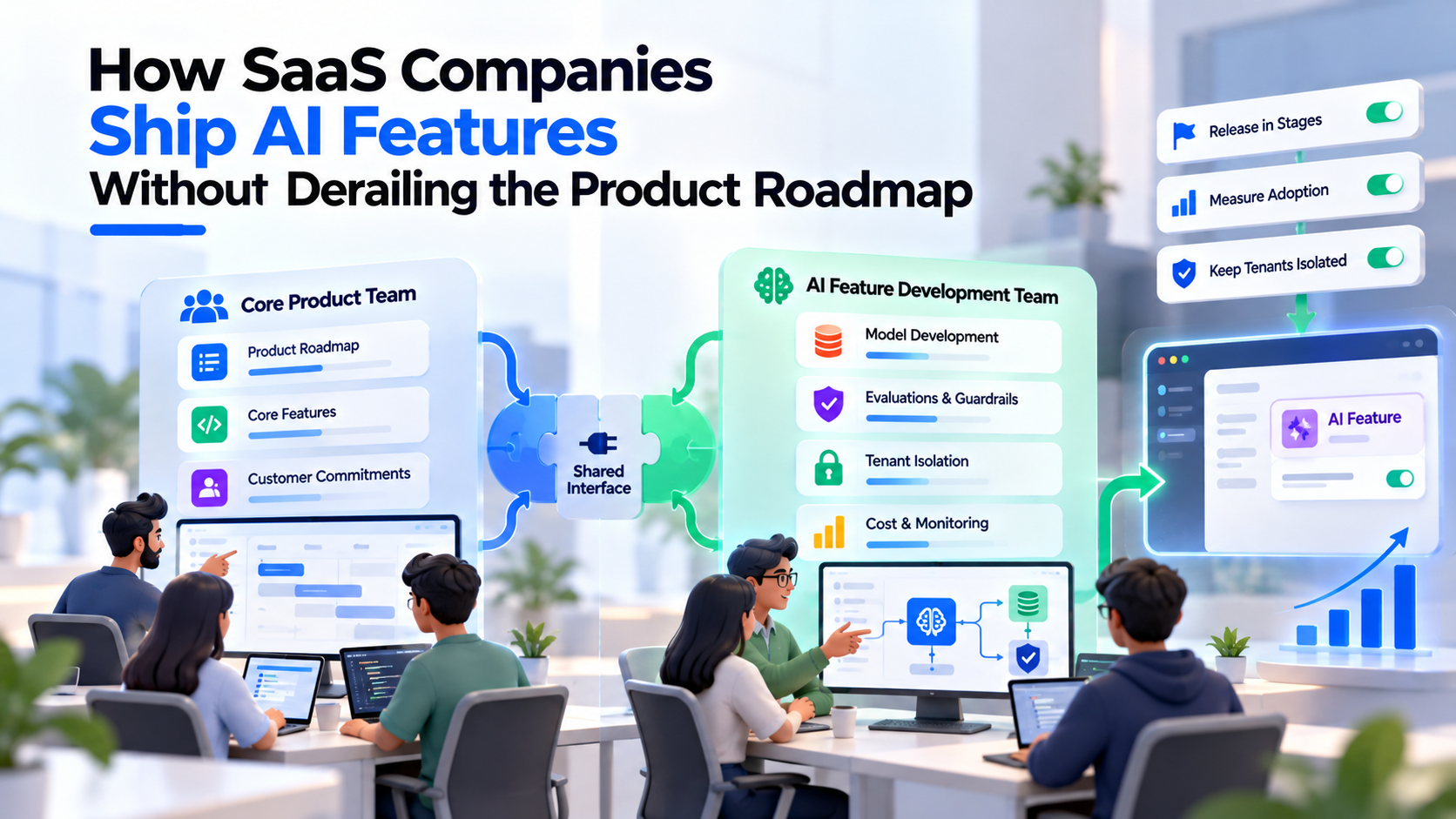
SaaS companies ship AI features without derailing the roadmap by running a separate SaaS product AI feature development team in parallel with the core team, agreeing a narrow interface between the two, and releasing every AI feature behind flags and eval gates. The core team keeps its commitments. The AI track owns models, evals, tenant isolation and model cost, and earns its way into general availability one stage at a time.
This guide is for the SaaS CPO or CTO who already has a roadmap full of promised work and a board asking where the AI is. It covers which features to pick, how a parallel team works, how to stage the rollout, how to keep tenant data apart, and how to think about cost, packaging and adoption. It sits in our AI strategy: pilot to production series. If your question is the earlier one, whether you can add AI at all without hiring an AI team, start with our guide on how to add AI to your product without hiring and come back here once the first feature is chosen.
Why do AI features derail SaaS roadmaps?
AI features derail roadmaps because they borrow the core team's scarcest resources, its senior engineers and its release process, for work whose scope is unknown at the start. A normal feature has a spec and an estimate. An AI feature has a hypothesis: the model might be good enough on your customers' data, at a cost you can carry, with no leakage between tenants. Nobody knows until the evals run.
The usual failure pattern looks like this:
- Two senior engineers are "temporarily" moved to the AI feature, and the committed roadmap slips by a quarter.
- The AI feature ships to everyone at once because there was no flagging plan, and a bad answer for one large customer becomes an escalation.
- Retrieval works in the demo tenant and then returns another customer's content in production.
- Model costs grow with usage while revenue stays flat, because pricing was never discussed.
Each of these is an operating-model problem rather than a model problem, and each has a fix below.
Which AI features fit the roadmap you already have?
The AI features that fit best attach to a job your users already do inside your product, on data your product already holds, with permissions your product already enforces. They make an existing workflow faster rather than inventing a new one.
Slack is a useful reference. Its engineering team describes Slack AI's summaries and search answers as working only on "the data that the user can already see," using the requesting user's access control lists, and generating point-in-time responses that are not stored on disk (Slack Engineering, April 2024). The feature rides on top of existing jobs (catching up, finding answers) and existing permissions.
Score candidate features before they go anywhere near the roadmap:
| Filter | Fits the roadmap | Likely to derail it |
|---|---|---|
| User job | Speeds up a step users already take daily | Requires users to adopt a new workflow |
| Data | Uses data already in your product, under existing permissions | Needs new data pipelines or third-party data first |
| Failure cost | A wrong output is visible and easy to ignore or edit | A wrong output changes records, money or permissions |
| Surface area | One screen or one API endpoint | Touches many modules owned by different teams |
| Measurability | Clear signal such as accept, edit or discard | Value only visible in quarterly surveys |
| Tenant variance | Works similarly across customer segments | Each large customer needs custom tuning |
Features that pass most filters are good candidates for the parallel track. Features that fail several filters are not bad ideas, but they belong later, after the team has a working release, eval and cost discipline in place.
How does a parallel AI team work alongside the core team?
A parallel track means a separate team, often an AI engineering pod, builds the AI feature while the core team keeps shipping the committed roadmap. The two teams meet at a small, explicit interface rather than sharing a backlog. If the pod model is new to you, our explainer on what an AI pod is covers the structure.
The split that works for most SaaS products:
| Area | Core product team owns | AI track (pod) owns |
|---|---|---|
| Roadmap | Committed features and dates | The AI feature's milestones and rollout stages |
| Interface | Stable internal APIs, events and UI slots the AI feature plugs into | Everything behind that interface: prompts, retrieval, model calls, guardrails |
| Data access | Permission model and tenant boundaries | Using those boundaries correctly in retrieval and logging |
| Release | The shared deployment pipeline and on-call | Flags, eval gates and the rollback plan for AI paths |
| Quality | Regression tests for the core product | Eval suite, golden sets and online quality signals |
| Cost | Infrastructure budget for the core product | Model usage per tenant, caps and alerts |
Three rules keep the split honest. First, the core team's contribution is scoped up front, usually an API or two, an event stream and a UI placeholder, and it goes on the core roadmap as a normal ticket with a date. Second, the pod does not change core modules directly; it asks through the interface. Third, one product owner sits across both tracks and decides when the AI feature is ready for each stage.
This is where an external team helps most. A pod brings evaluation and retrieval experience the core team may not have, and its work does not consume the engineers the roadmap depends on. If you decide later to bring the capability in-house, the interface and the eval suite are the handover points.
How do feature flags and staged rollout protect the roadmap?
Feature flags let you merge AI code continuously while controlling exactly who sees it, so the AI track never blocks a core release and a bad AI result never reaches everyone at once. Pete Hodgson's widely cited article on feature toggles, published on martinfowler.com in October 2017, describes four categories, and each maps to an AI need:
- Release toggles hide unfinished AI paths so the main branch stays deployable. Hodgson notes these are "transitionary by nature," so remove them after general availability.
- Experiment toggles split users into cohorts to compare an AI path with the existing experience.
- Ops toggles act as a kill switch when a model provider degrades, costs spike or a quality alert fires.
- Permissioning toggles control which plans, tenants or beta groups get the feature. For AI, add a tenant-admin opt-in, because some customers will want to approve AI use before their users see it.
Hodgson also warns that teams should treat toggles "as inventory which comes with a carrying cost" and keep that inventory low. Give each AI flag an owner and a removal date.
Atlassian's rollout of Atlassian Intelligence shows the staged pattern in public. The company announced its AI ambitions in April 2023, ran a beta program, and announced general availability in December 2023 for the Premium and Enterprise editions of its cloud products, with some capabilities still in beta and activation handled by organization admins (Atlassian, December 2023).
What eval gates should each rollout stage pass?
Every step from internal use to general availability should require the AI feature to pass a written quality bar on an automated eval suite, plus the signals that stage is designed to collect. GitHub describes running more than 4,000 offline tests, most of them in its automated CI pipeline, before changes reach production, followed by live internal evaluations "similar to canary testing" where a group of employees switch to a new model (GitHub Blog, January 2025).
| Stage | Who sees it | Gate to enter | What you learn |
|---|---|---|---|
| Internal | Your own staff on a test tenant | Offline eval suite passes the agreed bar; security review of data flows started | Obvious failures, latency, cost per task |
| Design partners | A few customers who opted in | Offline bar holds; tenant-isolation tests pass; kill switch tested | Real-data failure modes, admin concerns |
| Opt-in beta | Any tenant whose admin enables it | Online quality signals stable; per-tenant cost caps live | Adoption curve, support load, cost spread |
| General availability | Plans the feature is packaged into | Beta metrics meet targets; runbooks and on-call agreed | Retention and revenue effects |
Two practices matter more in SaaS than elsewhere. Run the eval suite against data shaped like each major customer segment, not one demo tenant, because a feature can work for small accounts and fail for enterprise ones. And treat a model version change as a release that passes the same gates. Our guide to moving an AI POC to production covers gate design and LLMOps monitoring in more depth.
How do you keep tenant data isolated in AI features?
Keep tenant data isolated by enforcing your existing permission model inside retrieval, prompts, caches and logs, not only in the application layer above them. The OWASP Top 10 for LLM Applications 2025 lists vector and embedding weaknesses as LLM08, warning about leakage "in multi-tenant environments where multiple classes of users or applications share the same vector database," and recommends "permission-aware vector and embedding stores" and strict logical partitioning.
AWS describes three isolation patterns for multi-tenant retrieval in its December 2024 post on multi-tenant RAG with Amazon Bedrock Knowledge Bases:
- Silo: a separate knowledge base and index per tenant. AWS calls this "the highest level of tenant isolation," at the highest cost.
- Bridge: shared storage with per-tenant prefixes but a separate index per tenant, which AWS says "strikes a balance between the silo and pool patterns."
- Pool: one shared index, with every query filtered by tenant ID. Cheapest, but isolation depends on the filter being applied correctly every time.
Most SaaS teams mix them: silo for enterprise tenants with contractual isolation terms, pool for self-serve tiers. Whatever you choose, add tests that try to retrieve another tenant's content and run them in the eval suite at every gate. Also check where prompts, outputs and traces are logged, since logs are a common leak path. If an outside team will work with customer data, our guide to data security in offshore AI development lists the controls to put in writing, and SaaS products serving healthcare or financial services should read our guide on taking AI from pilot to production in a regulated environment.
How should you plan for usage-based model costs?
Plan for model costs that grow with usage, not with seats. Each AI request consumes tokens or compute, so one heavy tenant can cost far more to serve than one light tenant on the same plan. GitHub names token usage as one of its main model performance measures, which is a useful signal of how seriously cost belongs in evaluation.
Practical controls, all of which belong to the AI track:
- Measure cost per successful task, broken down by tenant and plan, from the internal stage onward.
- Set caps per tenant and per request with alerts before they bite. OWASP lists unbounded consumption (LLM10) as a risk for the same reason.
- Route by difficulty to smaller models where evals show quality holds.
- Cache stable context where your provider supports it.
- Revisit model choice as volume grows; our comparison of OpenAI API vs open-weight models for production covers that trade-off.
How should SaaS companies package and price AI features?
Decide packaging before general availability, because it determines who gets the feature, how cost is recovered and what the sales team says. There are four common models, and companies move between them as features mature.
| Model | How it works | Fits when | Watch out for |
|---|---|---|---|
| Bundled in all plans | AI is part of the core product | It drives retention and costs are modest | Heavy users erode margin |
| Higher tier only | AI is a reason to upgrade, as with Atlassian Intelligence in Premium and Enterprise at launch | It clearly serves larger customers | Smaller tenants never see value |
| Paid add-on | Separate line item on any plan | Value varies widely by customer | Adds purchase friction; slows adoption |
| Usage or outcome based | Charge per use or per result | AI does work a human would otherwise do | Harder to forecast for buyer and seller |
Intercom is the clearest public example of the last model. It describes Fin's original pricing as pay-for-results: customers pay when Fin resolves an issue, and "If it doesn't, you don't." In March 2026 it announced a move from resolutions to a broader "outcomes" metric, because Fin increasingly handles multi-step work alongside human agents and success "stopped being binary" (Intercom Blog, March 2026). The lesson for a CPO is that the pricing unit should match what the AI actually does, and that unit may change as the feature matures.
How do you measure AI feature adoption?
Measure AI adoption as a funnel, from exposure to repeat use to business effect, and decide in advance what result would make you stop. Raw usage counts mislead because novelty inflates the first weeks.
A workable metric set:
- Exposure: share of eligible users who saw the feature.
- Activation: share who tried it at least once.
- Acceptance: share of AI outputs accepted, lightly edited or discarded. GitHub researchers found that the acceptance rate of shown suggestions predicted Copilot users' perceived productivity better than the other measures they examined (Ziegler et al., 2022).
- Repeat use: weekly users of the feature after the first month.
- Task outcome: time or steps saved on the workflow the feature targets.
- Unit economics: model cost per successful task, by plan.
- Account effects: expansion, upgrade or retention differences between tenants that use the feature and comparable tenants that do not, read with care since the groups differ.
Review these at each rollout gate. A feature with high activation and low repeat use usually has a quality or placement problem, not an awareness problem.
How fwdpod approaches this
Fwdpod builds dedicated AI engineering pods for startups and enterprises, covering LLM development, RAG systems, AI agents and product delivery, for buyers in the US, UK, EU and Gulf with engineering delivery from India. Our pods are 4–6 experts organized around a single measurable outcome, which suits the parallel-track model: the pod owns the AI feature behind an agreed interface while your core team keeps its roadmap. Pod templates include Voice AI, Agentic Operations, RAG and Knowledge, Compliance AI and Custom, ranging from 8 to 16 weeks. How the pod would work with your repositories and release pipeline, and how eval suites and flags are handed over, is something the team can walk you through on a first call.
For SaaS teams, see our AI for SaaS products page and our engagement models. To scope a feature, configure your AI engineering pod by answering five questions and receive a custom pod proposal within 48 hours, or talk to the team about pricing.
Frequently Asked Questions
1. Should the AI feature team sit inside the core product org or outside it?
For the first one or two features, a separate track with its own backlog usually works better, because it protects the committed roadmap and makes AI scope visible. Once AI features are routine, many companies fold the capability into product teams, with a small platform group owning shared evals, model access and cost tracking.
2. How do we stop an AI pod from creating code the core team cannot maintain?
Require the pod to work in your repositories, deploy through your pipeline and keep the eval suite next to the code from the first sprint. Agree the interface with the core team early, review architecture together at each rollout gate, and plan the handover as a milestone rather than an afterthought.
3. Do enterprise SaaS customers expect to opt in to AI features?
Many do. Security and procurement teams at larger customers often want to review how their data is used before their users see AI features. A tenant-admin control to enable or disable AI, plus clear documentation of data flows and model providers, removes a common blocker in enterprise deals.
4. Should we train or fine-tune models on our customers' data?
Most SaaS AI features do not need it. Retrieval over each tenant's own data, under its existing permissions, avoids mixing customers' data inside a shared model. Slack, for example, states that it does not train large language models on customer data. If you do consider training on customer data, check your contracts and involve counsel first.
5. How many AI features should be in flight at once?
Usually one per parallel team until the first one reaches general availability. The first feature builds the shared machinery: flags, eval gates, tenant-isolation tests and cost tracking. Later features reuse it and move faster, so running several at once before that machinery exists tends to multiply rework.
6. When should an AI feature be pulled back or switched off?
Use an ops flag to switch it off immediately for quality incidents, data leakage, provider outages or runaway cost. For slower problems, such as low repeat use or poor unit economics after a fair beta period, decide at the next gate whether to rework, re-package or retire the feature.